How OpenClaw's memory system works
LLMs don't remember anything.
Open a new conversation and the model has no idea who you are. It doesn't know what you're working on, what you told it yesterday, or what it promised not to do again. It answers questions, writes code, analyzes documents. But every conversation is a first meeting.
OpenClaw's memory system is an engineering hack to simulate remembering on top of a model that forgets everything. Not a model capability. A system design. Human memory is weights in a neural network. This is files on disk and tricks to get them into the model's view.
Three subsystems make it work.
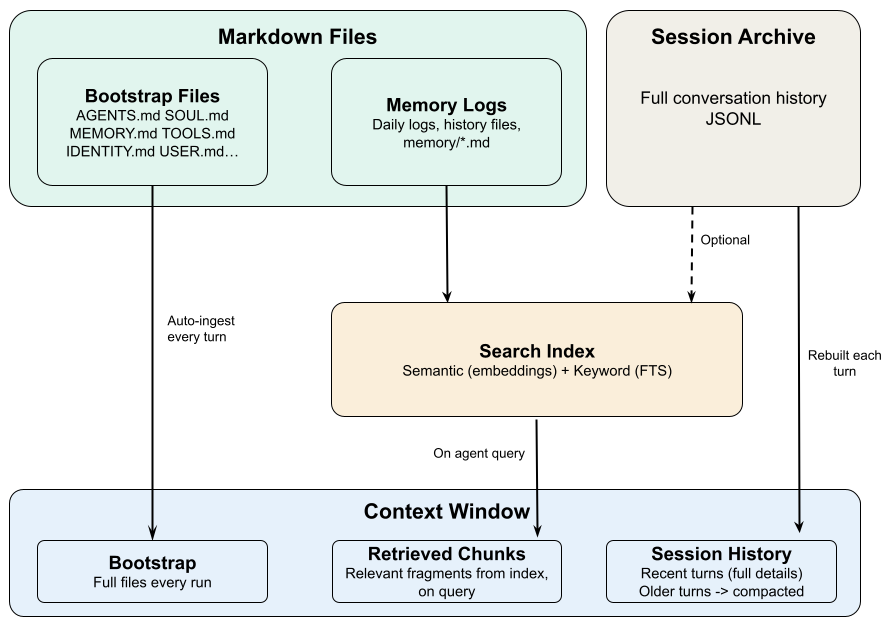
Where information lives
Memory starts with storage. OpenClaw puts information in three places, each with different durability.
Markdown files on disk are the most durable. Don't delete them and they last forever. Restarts don't touch them, switching sessions doesn't touch them.
Two kinds. Configuration files define who the agent is and how it behaves: SOUL.md for identity, AGENTS.md for workflow rules, USER.md for stable facts about you, MEMORY.md for decisions that should persist. These are long-term memory. Then there are daily logs like memory/2026-03-16.md that record what happened each day.
Conversation history is saved to disk in full, so you can resume tomorrow where you left off today. But "saved to disk" and "visible to the model" are not the same thing. Long conversations get their older parts compressed into summaries. The originals are still on disk; the model only sees the summary. Details get lost.
The context window is where the model actually looks. Your messages, its replies, tool outputs. This is the only thing that exists to the model. For Claude it's about 200K tokens, roughly a medium-length book. When there's too much to fit, things get cut.
Files are permanent. Conversation history is semi-permanent. The context window is gone the moment the session ends.
How information gets into the model
Information on disk that the model can't see might as well not exist. So how does it get into the context window?
Bootstrap injection. When a session starts, certain workspace files get loaded automatically: AGENTS.md, SOUL.md, TOOLS.md, IDENTITY.md, USER.md. Which ones depends on session type. MEMORY.md only auto-loads in the main private session, not in group conversations.
This is the most reliable delivery mechanism because it's unconditional. Doesn't matter if the content is relevant. It loads every time. That's why information in these files genuinely survives across sessions: even if conversation history gets compressed, the files reload on the next session.
The cost is fixed context space. Each file caps at 20,000 characters. All config files together cap at 150,000 characters (about 50K tokens). Anything past the limit gets truncated. The system can warn the agent that it's seeing a truncated version, but if the agent ignores that signal, the bottom half of the file has silently disappeared.
History rebuild. When you continue an existing session, the system reads conversation history from disk and loads it back into context. This is how the agent "remembers" what happened earlier in the session.
When history exceeds what fits in the context window, older turns get compressed into summaries. This is compaction. It preserves the general direction but loses details, specific constraints, exact wording.
Sub-agents get a smaller set of bootstrap files. They load AGENTS.md, TOOLS.md, SOUL.md, IDENTITY.md, USER.md, but not MEMORY.md. So sub-agents have no access to accumulated cross-session memories. If your workflow uses sub-agents for real work, you need to be aware of this blind spot.
On-demand retrieval
Config files load every time. That handles frequently needed information. But what about session transcripts from months ago, or a decision you made on a different project last quarter? You can't inject all of that upfront. It would blow out the context window.
OpenClaw builds a searchable index over all memory files with two matching modes: keyword search for exact terms, semantic search for meaning-based matches. The agent calls memory_search to query this index and pull relevant fragments into the current context.
Daily logs go through this path. They're not bootstrap-injected (months of logs would overflow context), they're retrieved on demand. This is a design convention, not a guarantee. The system won't push today's log into context. The agent has to ask for it.
Two prerequisites are easy to miss.
First, only content written to a file can be retrieved. If something was said in conversation but never saved to a file, the retrieval system can't find it. It doesn't exist as far as search is concerned.
Second, the agent has to know it should search. memory_search is a tool. Whether the agent uses it well depends on prompt design and the rules in AGENTS.md. If nobody told the agent to check its notes, it won't. The retrieval system is there, but it stays quiet unless something triggers it.
The hybrid search works well enough for finding related content, but it has a hard limitation: it finds similar text, not relationships between content. Tell the agent "Alice leads the auth team," then ask "who should I talk to about auth permissions." Search can find mentions of Alice, and mentions of auth, but it doesn't understand that Alice manages auth. The information is fragments, not a graph. You don't notice this with 50 memories. You notice it with 5,000.
How the three fit together
The whole system is answering one question: how do you get the right information in front of the model at the right time?
Files handle stable information the agent always needs. Conversation history handles continuity within a session. Retrieval handles historical content, fetched when relevant.
But there's a core assumption baked into all of this: information has to be explicitly written to a file to enter the system.
Say "remember, never do X again" during a conversation. That instruction lives in conversation history. When the history gets compacted, or the session ends, it's gone. The only way to make it stick is to write it into AGENTS.md.
This is a deliberate design choice. Rather than having the system guess what's worth remembering, the user or agent decides what gets persisted. The tradeoff: higher barrier to use. The upside: predictable behavior. You always know why the agent remembers something and why it doesn't.
These three subsystems explain most of the weird behavior you'll see.
Why does the agent forget things? Why does some information survive across sessions and other information vanish? Why does the agent act amnesiac on a new machine? The answers trace back to storage, injection, and retrieval. The next post will go through the specific failure modes.