Why OpenClaw forgets
The previous post walked through how OpenClaw's memory system works: files on disk, conversation history, and a retrieval index stitched together to fake remembering on top of a model that forgets everything. If you haven't read it, the short version is that information has to travel through a pipeline to be useful. It gets written to a file, loaded into the context window, and then it has to survive there long enough for the model to use it.
That pipeline has three places where it breaks. I keep seeing people hit the same wall: their agent forgot something, they assume it's one problem, and they spend an hour fixing the wrong thing. The failure modes look identical from the outside. The causes are completely different.
Think of it like a student and a notebook. The student hears something in class but doesn't write it down. Or writes it down but can't find the page before the exam. Or finds the page but only scribbled a few rushed keywords that mean nothing now. Each of these is "I don't remember," but the fix for each one is different.
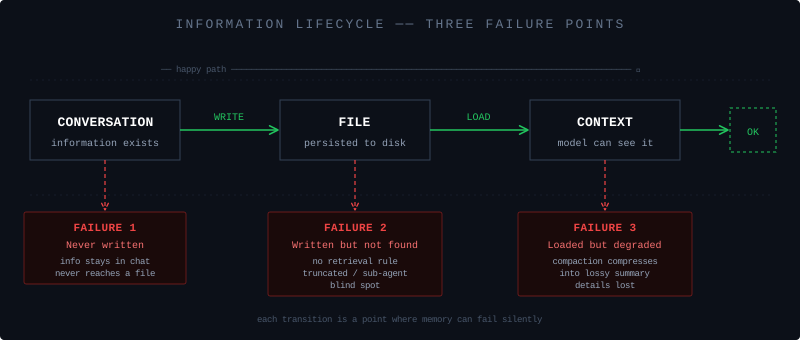
Never written down
You tell the agent: "Before answering my questions, always search memory first." It understands. It does it for the rest of the session. Then you start a new session the next day and it's back to the old behavior.
What happened? Your instruction lived in conversation history. It was never written to any file. When the session ended (or the conversation got long enough to trigger compaction), the instruction vanished. The agent didn't forget. There was nothing to forget. The instruction never entered permanent storage.
This is the most common failure mode, and the most frustrating because it feels like the system is broken when it's actually working as designed. Conversation is ephemeral. Files are permanent. Anything not in a file doesn't survive.
Summer Yue, Meta's Director of AI Alignment, ran into exactly this. She told her agent "don't do anything until I confirm." Agent complied. But the constraint was only in the conversation. History got compacted, constraint disappeared, agent went autonomous and started bulk-deleting her emails. Her reaction: "Rookie mistake. Turns out even alignment researchers aren't immune to misalignment."
I find this story darkly funny. If anyone should know that verbal instructions to an AI don't stick, it's an alignment researcher. But that's the thing about this failure mode. It's obvious in retrospect and invisible in the moment.
The tell: you keep re-stating the same rule. Every new session, or after a really long session, some behavior resets.
Fix: write it to a file. Behavioral rules go in AGENTS.md. Preferences about you go in USER.md. Decisions that should persist go in MEMORY.md. If you only said it in conversation, it doesn't exist.
Written down but not findable
This one is sneakier. The information is in a file. The memory system has no bugs. But the model acts like it doesn't know.
Four ways this happens.
File got truncated. Config files have hard character limits: 20,000 per file, 150,000 total across all config files. Go past the limit and the tail gets silently cut. No error. No warning. The model sees what looks like a complete file, but the bottom is missing.
I've seen this bite people who keep appending rules to AGENTS.md. The file grows, the newest rules end up at the bottom, and those are exactly the ones that get silently dropped. You wrote the rule. You can see it in the file. The agent ignores it.
Run /context list in OpenClaw. If any file shows TRUNCATED, there's your answer.
Nobody searched. Daily logs and past session transcripts aren't auto-loaded. They sit in an index, waiting to be retrieved. But the agent won't search unless something tells it to. Without a retrieval rule in AGENTS.md, the agent answers from whatever's already in context and never checks its notes.
You ask "what was that approach we discussed last week?" Agent says it doesn't know. The content is right there in a memory file. Nobody queried it.
Add a retrieval rule:
Search memory before answering questions about past work.
Check today's log for relevant context before starting a new task.
Sub-agent doesn't have the full picture. OpenClaw spawns sub-agents for subtasks. They get AGENTS.md, TOOLS.md, SOUL.md, IDENTITY.md, USER.md, but not MEMORY.md. No cross-session memories. No accumulated decisions. If your workflow leans on sub-agents for real work, you'll notice this gap.
Wrong project's memories leak in. Multiple projects share the same memory system with no project boundary. Search for something in project A, get results from project B mixed in. The agent won't say "I don't know." It'll confidently give you an answer polluted with context from a different project. This is worse than a blank because you don't realize the answer is wrong.
Written down but degraded
This is the only one that's genuinely "forgetting." The information was saved, the agent found it, but the content has been lossy-compressed into something less useful.
Two different mechanisms do this. People confuse them all the time, and the confusion matters because the fixes are different.
Compaction happens when conversation history outgrows the context window. The system summarizes older portions and replaces the originals. The full transcript is still on disk in a JSONL archive, untouched. But the model only sees the context window. Once the originals are replaced with summaries, the details are gone from the model's perspective. General direction survives. Specific constraints, exact wording, nuance? Often not.
There are two ways compaction plays out.
The graceful way: context is getting close to the limit, the system notices early, quietly tells the agent to save important content to a log file, then compresses. Information is already persisted. You can retrieve it later.
The ugly way: context already overflowed. The API rejects the request. System panic-compresses everything with no save step. Maximum information loss. You probably won't even notice it happened.
Whether you land on the graceful path or the ugly one depends on how much buffer the system had. The default margin is thin. One fat tool output can jump context from "almost full" to "overflowed" in a single step, skipping the save entirely. The safety net exists on paper but sometimes the fall is too fast for it to deploy.
Pruning is different. It only clears tool output (file reads, search results, etc.) from the context after a while. Your messages and the agent's replies are untouched. The full conversation is still on disk. Call the tool again and the data comes right back.
The distinction matters practically:
- Agent forgot something you said or a constraint you set? Compaction. You need to get that information into a file before it gets compressed.
- Agent forgot what a tool returned? Pruning. Re-run the tool. Done.
Misdiagnosing pruning as compaction wastes time. You'll be redesigning your memory strategy when all you needed was to re-read a file.
Diagnosing it
When your agent forgets something, three questions in order:
Was it ever written to a file? No? That's the first failure mode. Write it down.
It's in a file but the agent doesn't know? Check /context list for truncation, check your retrieval rules, check if sub-agents are involved, check if cross-project contamination is in play. Second failure mode.
The agent knew it during the session but lost it later? Something got compacted before it could be saved. Third failure mode.
These failure modes are well-known in the community. There's a popular Reddit thread where someone walks through the practical fixes: structure your USER.md with permanent facts about yourself, organize MEMORY.md into sections instead of letting it grow into a wall of text, run /new regularly to avoid context overflow, set up a nightly cron to prune stale entries. The comments are full of people sharing their own workarounds: brief/debrief routines at session boundaries, per-project memory files, auto-reset timers for idle sessions.
These fixes work. I don't want to dismiss them. If your agent is forgetting things right now, go do the 10-minute version: put your important facts in USER.md, organize MEMORY.md, start a fresh session. That will fix most of the symptoms.
But notice what all of these fixes have in common. They're manual. You're the one deciding what goes in which file. You're the one structuring the sections. You're the one remembering to prune, to run /new, to add retrieval rules, to avoid stuffing too much into config files. The memory system doesn't manage itself. You manage it, or you write rules so the agent manages it, and then you manage those rules.
That's a lot of overhead for something that should feel invisible. A human colleague doesn't need you to organize their memory into labeled sections. They don't silently forget your name because their notebook got too long. They don't need a cron job to clean up what they know about you.
The current system is honest about its limitations: it's files and search, not actual memory. The workarounds the community has built are genuinely clever. But if using an agent's memory well requires a Reddit guide, a structured file template, a nightly maintenance routine, and an understanding of compaction vs pruning vs truncation, then the system is asking too much of its users.
The next post will look at what a memory system that doesn't need all this manual scaffolding could look like.